
Before the late 1980s, the primary user interface to computers was the command line. The emergence of graphical user interfaces with the direct manipulation paradigm freed us from the limitations of the command prompt. Now, the dominant UI for the generative AI systems is just textual dialogue: the chatbot. Let’s ask ourselves: why are we again confining ourselves to solely textual input and output?
Introduction to multimodal interaction
Has a swear word ever slipped your tongue while using a computer? Oh how I wish the computer would understand when I shout at it! But let’s think about this: why not? Imagine all the possibilities if we enabled computers to be multimodal: understand more than just typed text and click with a mouse.
The idea of using multiple modalities together – known as multimodal interaction – has been researched for decades. In the seminal article “Put-that-there”: Voice and gesture at the graphics interface, Richard Bolt described his experiments of combining graphical user interfaces with speech input already in 1980.
Since then, the main hurdle for multimodal interaction has always been implementation. Building such UIs has been technically challenging, which has prevented them from being used in real-world applications.
Recent advances in multimodal large language models (LLMs) and modern speech processing libraries mean processing audio, visual, and textual inputs simultaneously and in real time is easier than ever. At the same time, we are hitting the limits of expressivity and interaction bandwidth of chat UIs. It is time to move beyond chatbots to multimodal interaction.
The limitations of current UIs
With the chat-based user interfaces, like those we use with LLM chatbots, you can express yourself freely without worrying about syntax unlike in the old command line interfaces. However, chatting comes with notable limitations:
- Sequential interaction: Conversations depend on turn-taking, slowing down real-time tasks.
- Limited efficiency: Typing, especially on mobile, is slow, ties your hands, and requires all your attention.
- Navigation: Scrolling back through chat history and referencing previous interactions is tedious.
While chatbot-like UIs have come a long way from early command-line interfaces, they remain fundamentally linear.
Graphical user interfaces (GUIs), pioneered by Xerox PARC and popularized by Apple and Microsoft, revolutionized computing by introducing direct manipulation and visual recognition instead of recalling commands. Point-and-click made interactions intuitive and expressive. Yet, GUIs have their limitations, too:
- Limited modalities: Interaction remains confined to pointing, which is assisted with typing on the keyboard.
- Lack of memory and context: Unlike chatbots, GUIs don’t remember past actions or conversations beyond the latest clicks and changes in the modes of the UI.
Even today’s so-called multimodal LLM solutions fall short. Uploading an image to chat about it or generating an image via text prompt are steps in the right direction, but they still rely on text-based dialogue.
Basics of multimodal interaction
True multimodal UIs would combine voice, gestures, visuals, and touch seamlessly. User’s action through different modalities and the response from the computer system form an interesting network of events, as described in the article “Multimodal Interfaces: A Survey of Principles, Models and Frameworks” by Dumas, Lalanne and Oviatt in 2009.
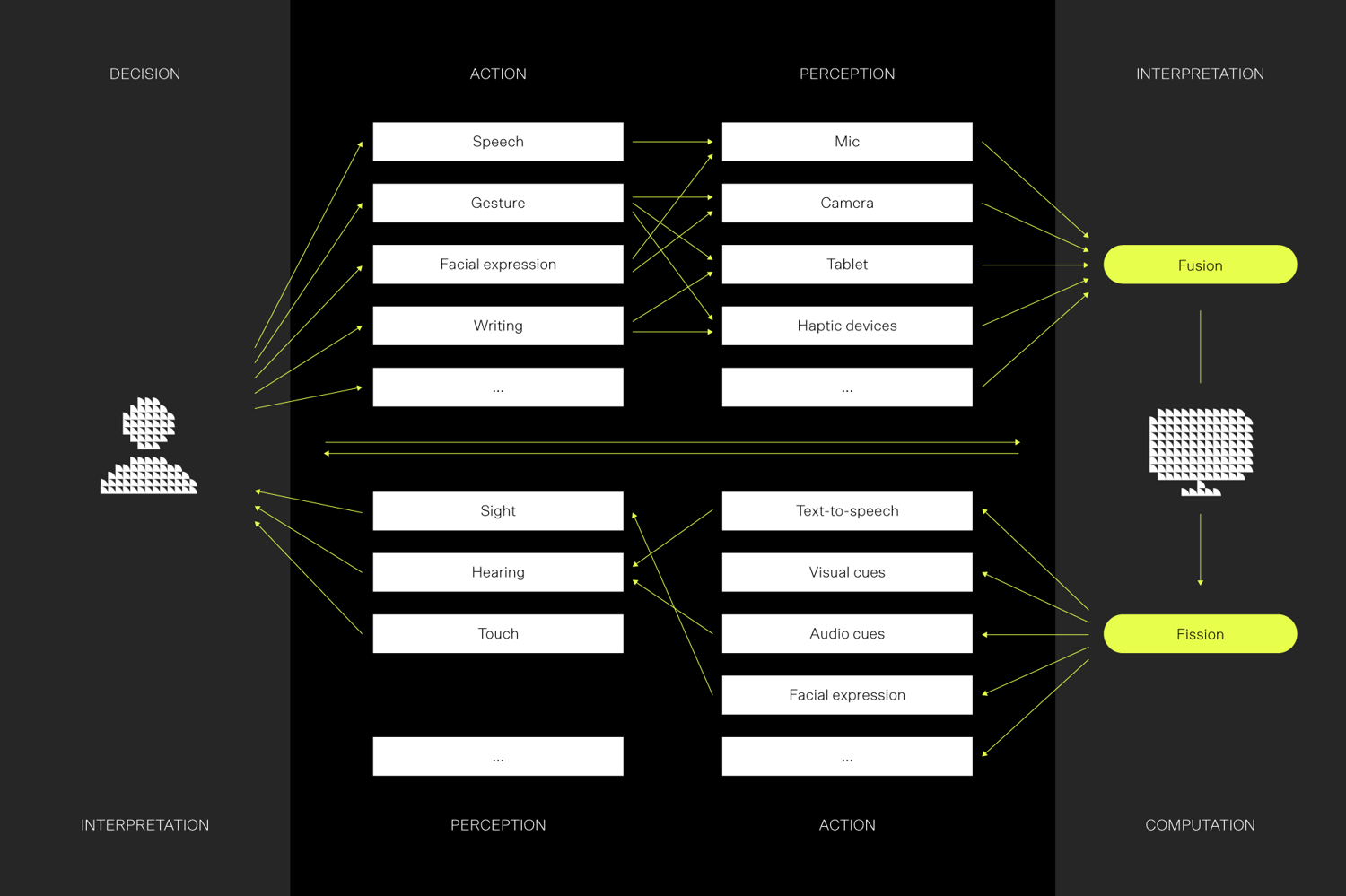
Figure 1: A representation of multimodal man machine interaction loop, by Dumas, Lalanne and Oviatt, 2009 [redrawn].
Multimodality can take place in several modes:
- Complementary modalities: Drag a file to a destination folder and say “Copy it here” to distinguish this from just moving the file.
- Redundant modalities: Double-click a file while saying “Open,” just to be sure.
- Sequential modalities: Click to select a file, then say, “Edit this.”
- Corrective interaction: If a voice command is unclear, the system could ask, “Did you mean file A or file B?” – and you could use another modality to provide corrective action, in this case clicking on the right file.
The last one is especially powerful. If the multimodal UI does not fully understand your voice command, it can present you with corrective options in a different modality instead of the same one that you had difficulties with in the first place.
Front-facing cameras on laptops and phones open new interaction possibilities for using video and gestures as input. These have been mostly underutilized so far, but we should also remember their potential:
- Gesture recognition is already used in video meetings for generating visual effects.
- Emotion recognition is technically possible but limited by privacy and ethical concerns (see also EU AI Act).
- Mobile gestures, such as shaking a phone to undo have been attempted but not widely adopted.
New possibilities with real-time APIs
Processing human speech has taken tremendous steps lately. The latest language models transcribe speech fluently and almost in real-time. The speech generation can mimic human voice so that it is almost indistinguishable from real humans. On top of this, the latest LLMs have very small latencies in processing text. All this means that speech input and output is easier than ever to embed in user interfaces.
Multi-modal LLM APIs are not yet completely ready to process parallel multimodal input. At this moment the application developers need to build the logic to handle multiple input and output modalities. We can expect that this will develop rapidly especially if multimodal UIs will gain more popularity.
Context is more than just chat history
Remembering context is where LLM-based chat UIs are good at. They use past conversations to tailor the next responses accordingly. It can be used to clarify user’s intent and deliver personalized outputs.
The context in multimodal interaction is much more than past text that the user entered. The context includes input and output data from all modalities. For example, if you point an object on the screen and utter a sentence at the same time, the multimodal LLMs can use the knowledge of the items that have been presented on the screen and what the user is pointing at currently.
In fact the context should be seen in large, encompassing all current and past multimodal input, user profiles, device sensor data, and environmental information.
Use cases and future ideas
The technical capabilities are already there. The last barrier we need to overcome is in design. What use cases are most fruitful to use multimodal interaction? The design of multimodal features requires careful consideration of the user’s tasks, abilities, and context. Some modalities may be limited depending on the context, e.g. voice input in crowded or socially sensitive environments. Your possibilities for viewing visual output can be limited e.g. while driving a car, when you are not wearing your reading glasses, or if you have a visual impairment.
Eventually, it can be very useful that you can replace modalities when needed. A well-designed multimodal UI helps users to replace modalities: in the crowded train you may be able to listen with the earphones but not speak, so you could respond to the voice UI with traditional tapping on the touch screen.
To inspire you to think about the possibilities of multimodal UIs, think for example of the following use cases:
Using voice for non-visual background task: Imagine that you are working on a document, and then you get a small notification in the top corner of your screen about an incoming email. You don’t want to navigate away from the document, so you use your voice to ask the email program in the background to read the latest email aloud. After a few sentences you know that this is not urgent, so you can continue typing on your document.
Image manipulation with voice commands: you are editing a photo of your family in a beautiful landscape, but there is a car in the background spoiling the perfect photo. You select the car with a lasso tool and use your voice as a complementary modality by saying “remove this car”. The system recognizes the multimodal interaction and passes both the utterance and the visual interaction to the AI as context for processing.
Multimodal AI assistant in a voice call: Imagine being in a voice call with your colleague. You agree that you need to find a common available time slot for your next meeting. The multimodal AI assistant can listen to the discussion between you two about when you would want to meet, and the assistant can automatically show proposed times on your mobile phone screen. You can use another modality, the touch screen, to select the most suitable of the proposed time slots.
What would be your favourite multimodal use cases? When you combine your understanding of the needs and use context of different users with the possibilities of multimodal interaction, it is surprisingly easy to think of further application ideas. For example, imagine a doctor’s appointment: how would multimodal UI help the doctor to take notes or search for information, when their hands (and mind) are occupied in examining the patient?
Conclusion: beyond chatbots
Multimodal interaction has the potential to take genAI user interfaces and applications to a completely new level. With the latest advances in genAI, multimodal LLMs, and real-time APIs, we no longer have technical barriers to implementing multimodal interaction.
The question is no longer if we can combine voice, gestures, and visuals with the genAI – but when we will, and how profoundly it will reshape our lives.