Yes, this title has been made with prompts by AI.
Funny how things change consistently. We live in a world where it is hard to keep track of every new piece of technology. As designers, we have to train and adapt to the new trends, and when it comes to AI that is no different.
It's natural to be worried about the potential impact of AI on our jobs. However, there is no reason to be fearful of this new technology. Throughout history, humans have always created new tools and technologies to assist them in their work, and we will continue to do so as long as we exist. Therefore, the question of whether AI will replace designers is ultimately a waste of time.
With that in mind, I would like to offer a metaphor that I believe will help illustrate this:
The airline industry provides an example of this phenomenon in action. Since the introduction of fly-by-wire systems, pilots have needed to acquire more technical knowledge and skill in order to operate increasingly complex planes. However, despite these advances in automation, pilots are still an essential part of the aviation industry. Similarly, designers won't be replaced by AI, but rather will become operators of more sophisticated AI-powered machines. These new tools will help designers to be more efficient and productive, enabling them to design applications and interfaces more quickly and with fewer errors. By expanding our abilities, AI will allow us to address accessibility and usability concerns more effectively, ultimately improving the overall quality of our work.
I’m no stranger to AI. I have had the chance to collaborate on many projects that have used this technology in the past. But when it comes to design, it has never been a part of my workflow. With the new tools and chatbots that have appeared recently, I have been wondering about the possibilities of how we could incorporate this into our day-to-day to optimize our results and maybe even change the way we design for the world.
Generative Artificial AI has been in the news recently but doesn't have a clear application in design processes. So to try it I decided to apply it myself in a sample project.
For this the project had to be:
- Something that cannot exist or doesn’t exist yet
- Something very hard to replicate or hard to conceptualise
- Something that would be very hard to get content from the client
This brought me back to one of my passions: Space. And what better than the Hilton space hotel from “2001: A Space Odyssey”? This was perfect. So all I needed for my “Brief” was this: Hilton wants to build a concept landing page for their new resort in space. They don’t have a name, they know they want some name options. Their hotel will orbit the earth, it will be the most luxurious resort ever built, with unique transfers departing from Cape Canaveral. Every suite will be unique. They don’t have any copy or text photography available and they need some direction on it.
Where do we start
Easy, let’s go to Chat GPT to ask for some name options.
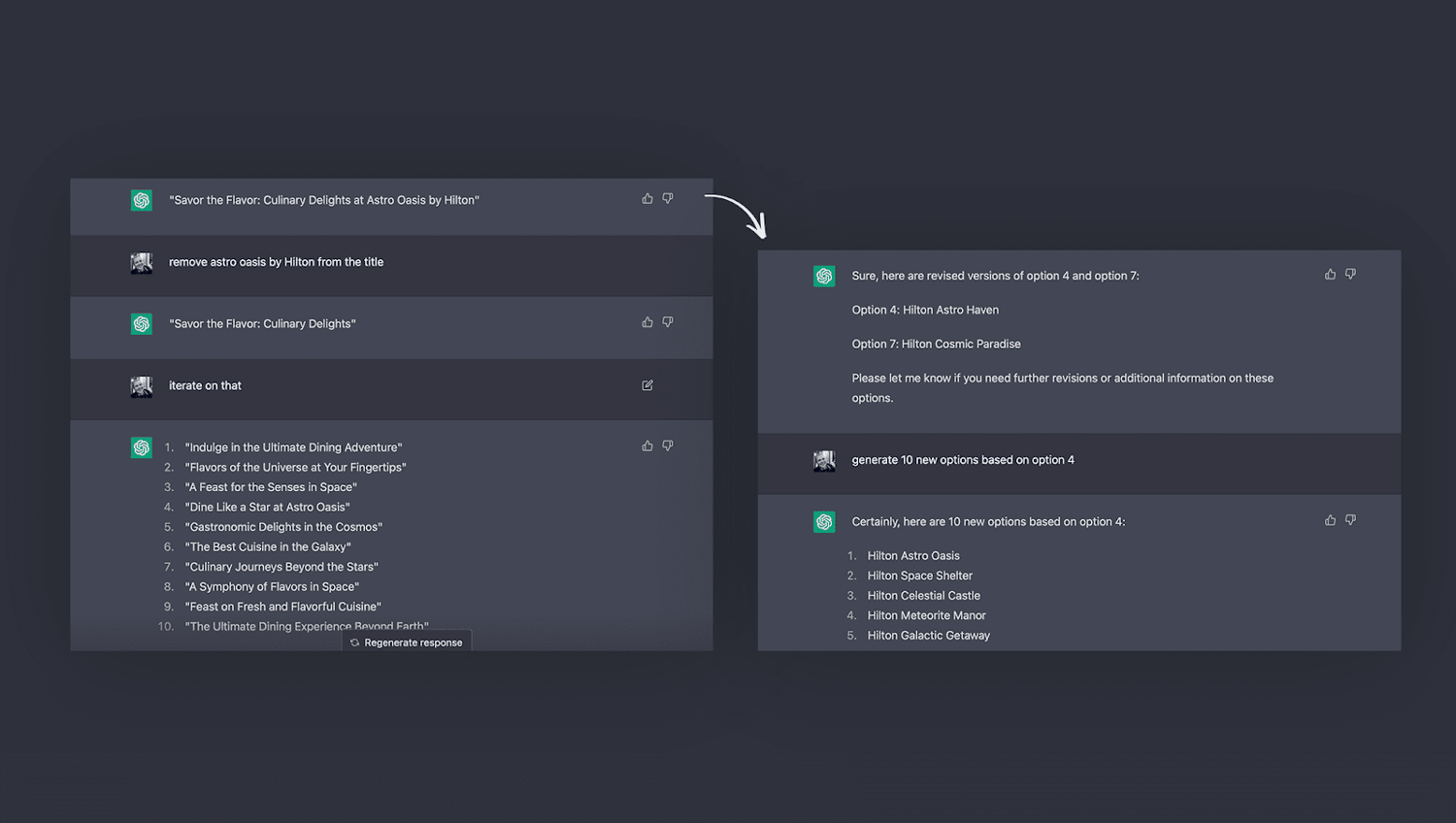
Astro Oasis sounds like a solid option, we can pick this for now, we will create a simple logo for this concept, but ideally, we will run this with the client...
The next step will be to create a sketch by hand, even though we are utilizing AI tools for this exercise it is very important not to lose the essence of every design, that's why sketching is so important in my process. I created a simple sketch by hand of a standard landing page. (We all know the common landing page used for selling any type of service) since this was a hotel I needed a simple layout to call out a beautiful shot of the property, the biggest 3 selling points - a video or hero shot, and then key features of the resort.
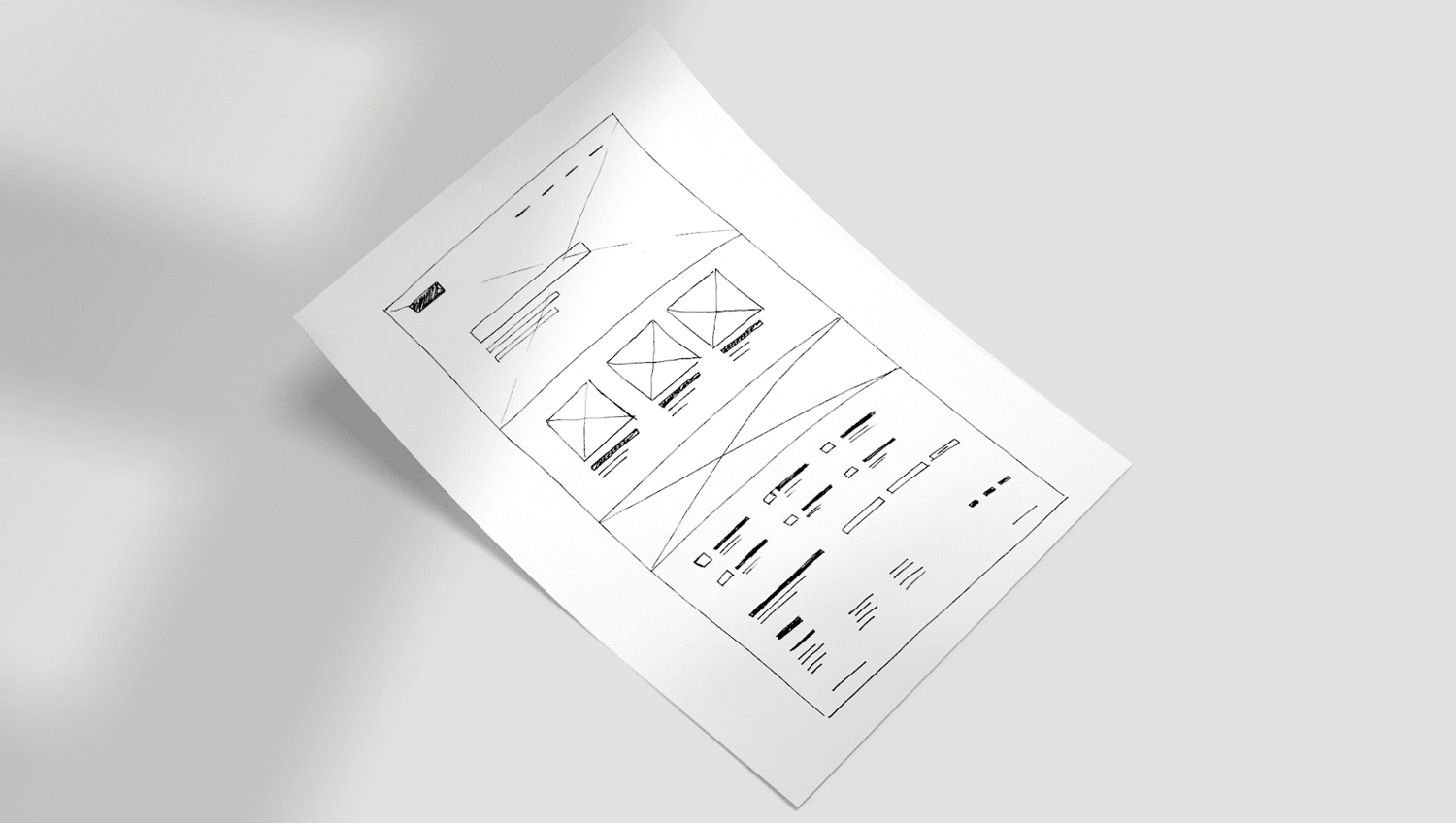
Normally we would convert this by hand on Figma, and it will be turned into a wireframe, we could use a standard wireframe package or any other kind of existing template, but with the power of AI, Uizard allows us to scan a sketch made by hand and in a minute or two convert it to a wireframe.

The Uizard is a SaaS rapid prototyping tool that provides users with drag-and-drop components and templates so that they can quickly and easily design mobile apps, web apps, websites, and desktop software. It is designed so that users familiar with Google Slides, Keynote, or Powerpoint can work in Uizard to contribute to the design process.
Uizard’s deep learning algorithms can extract components and styling properties from images, photos, screenshots, and mood boards. The Uizard AI Design Assistant generates colors, typographies, styles, and components which the user can then customize. Uizard can make use of existing assets by extracting styling properties and components from a URL, an app screenshot, or from a Sketch file.
But beware, the converted wireframe is not always perfect, it requires some tweaking but is still a solid foundation, with this wireframe we can then move on to exploring the look and feel of our brand and final concept. Uizard is very good at giving predefined solutions or even connecting components that the AI interprets as buttons or links. But it's still in a very “green state”. Also, it's not entirely an AI tool, it's just powered by AI to convert sketches into wireframes through object recognition
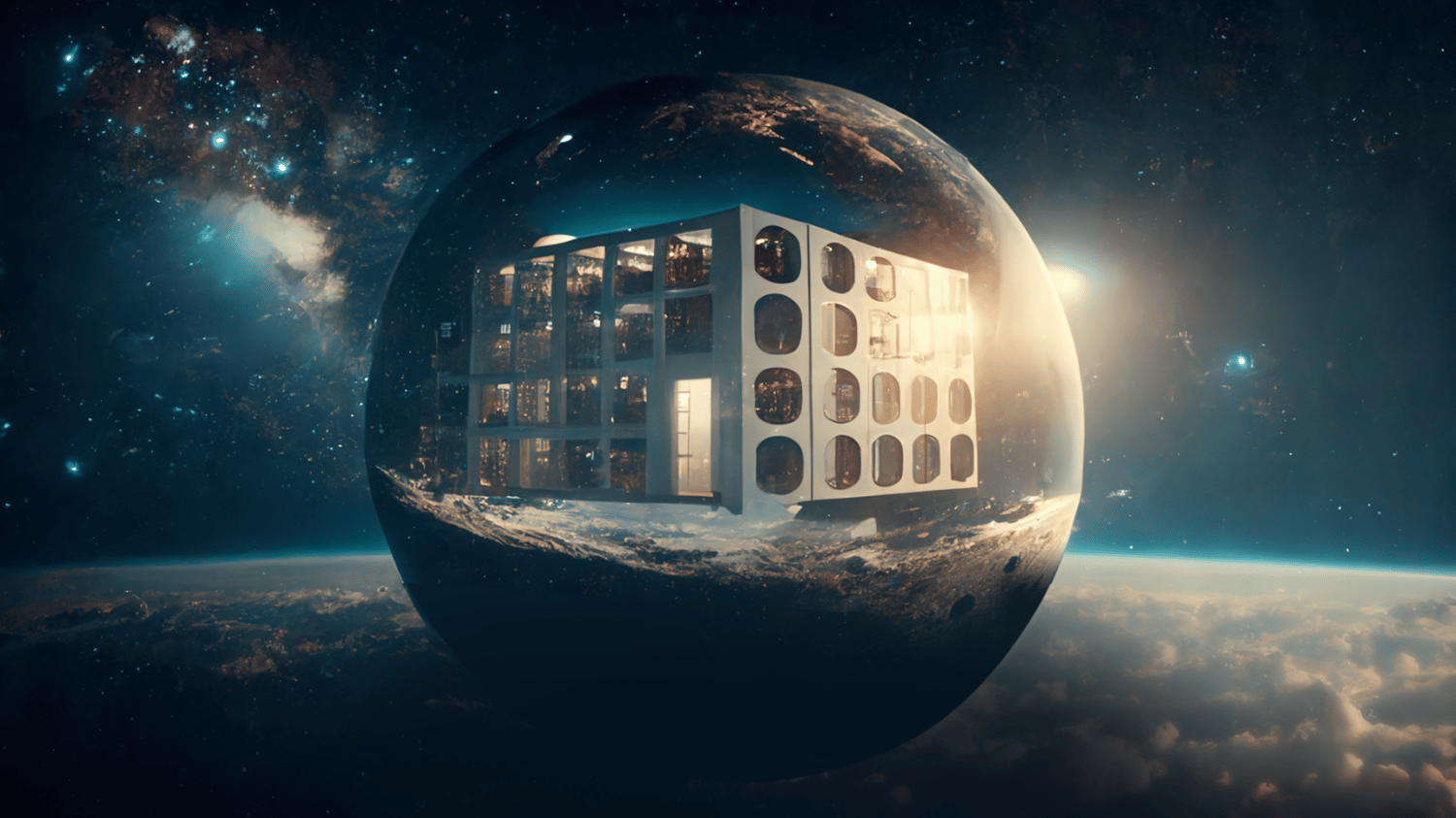
Once the sketch was generated we needed some images for inspiration. I started by testing on Dall-e, the rendered images were not of quality, and getting the results wanted was hard, even with the right prompts. Midjourney took a bit of a learning curve, but with the help of some great tutorials found online I found the groove and I managed to generate my first successful images.
Here is when we first saw what would become the Astro Oasis - Note the first (non-existent now or soon unfortunately) luxury resort in space.
With some images, the next step was to design a basic logo and Search a Color palette with an ai engine, get ideas thrown by it to ai http://colormind.io/image/
Colormind is pretty simple, based on the uploaded image you can pull the Colors of it and create cohesive color pallets. It can generate color palettes of harmonized color schemes automatically using artificial intelligence, or extract color from uploaded photos and generate a color palette called "Colormind" is. I tried using it because it is a convenient site that suggests various patterns when designing, illustration, interior, etc. are troubled. When clicking "Generate" from the top page, a color palette that gradually becomes 5 grades with good compatibility from zero is generated. Learn more about how it works here: http://colormind.io/blog/generating-color-palettes-with-deep-learning/. I created two options that I liked, one main one and a secondary Color palette and I went on to create more images.
DALL-E, written as DALL·E on the company website, is a machine-learning model created by OpenAI to produce images from language descriptions. These text-to-image descriptions are known as prompts. The system could generate realistic images just from a description of the scene. DALL-E is a neural network algorithm that creates accurate pictures from short phrases provided by the user. It comprehends language through textual descriptions and from “learning” information provided in its datasets by users and developers.
Dall-e is not powerful at generating very high-fidelity images on its own, but in August 2022, OpenAI introduced a unique new feature called outpainting to DALL-E 2. This allows users to continue to create an image beyond the original borders, taking visual elements in a new direction, just through natural language description. This added feature was a nice balance to OpenAI’s previous edit feature in DALL-E called inpainting, which allows users to change a generated image. The new feature lets creators make large-scale images by adding the extension. With the new process, developers at AI get a better understanding of DALL-E’s different strengths and capabilities. this could be valuable at the time of creating mockups or samples for a hero for example. Something that can whip a quick draft that we can later replicate in photoshop or Figma.
Just like DALL-E, MidJourney is a text-to-image AI that generates gorgeous visuals based on your text prompts.
While DALL-E is designed to generate anything you can imagine – including the mundane or ugly MidJourney is essentially built to deliver much more reliably ‘aesthetic’ images by default. For the casual user, this bias can be an advantage. Midjourney is a fantastic option for rapidly generating a coherent set of imagery, from stock illustrations to images that can be included in a presentation for a pitch. Given the choice, MidJourney prefers to create images with complementary colors, artistic use of light and shadow, sharp details, and composition with satisfying symmetry or perspective. In the words of its founder, “we just want it to be easy to use – and we want the pictures to look good.”
If the prompts are used wisely then the images that Midjourney will provide will be enough to be utilized as a base for inspiration or even part of art for a design. There is a debate if AI-generated images are truly open-sourced, but the power stands on the inspiration and freedom of options that we can generate:
“However, AI art cannot be banned or completely removed from the art sphere. AI art tools make it easier for artists to conceptualize their vision and people must learn to work with them and work around them.”
https://www.inc.com/inc-masters/three-ethical-concerns-about-ai-generated-art.html
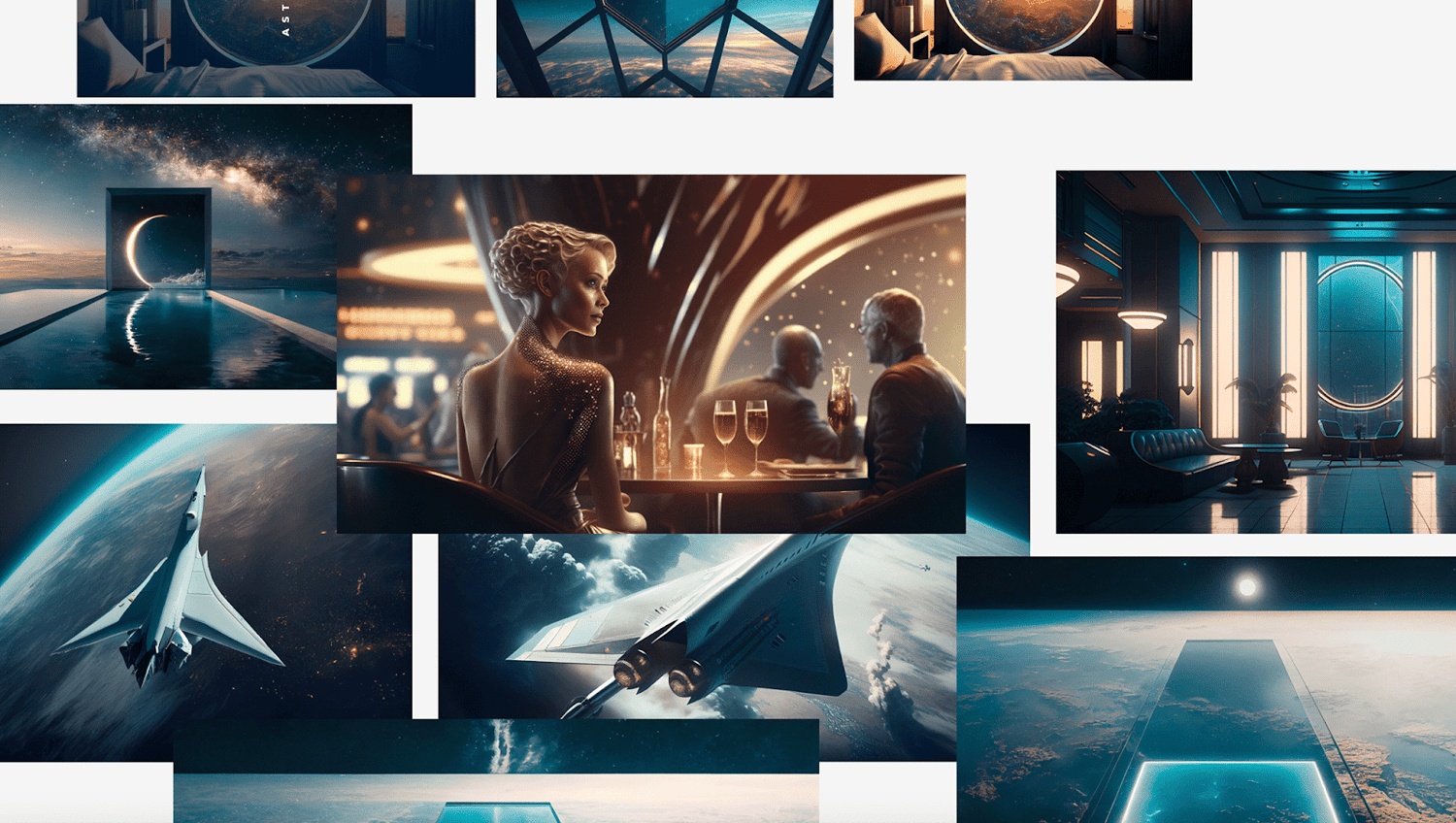
Combining these two can be very valuable if used wisely, we can create images in Midjourney and later on modify them on Dall-e to extend them and add pieces that later on can create a draft of a concept. These concepts then can later be polished in Photoshop or Figma and presented to the team or even the client.
Dall-e gave me good direction on where to add text or how to extend the images properly to include content. Then I can edit the image in photoshop and replace it with the content provided by ChatGPT.
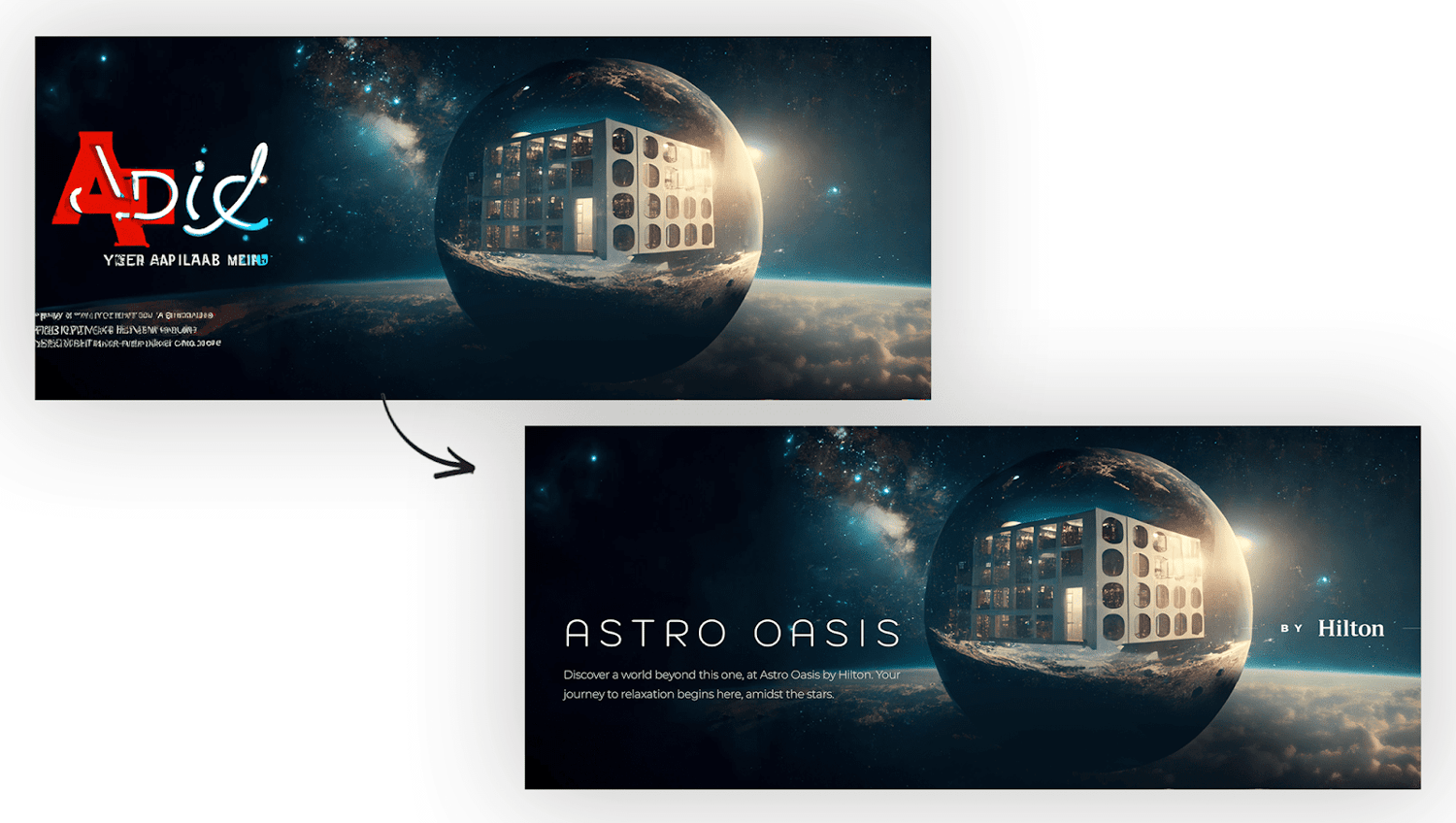
It is possible to create a high-fidelity wireframe of a landing page with images and text that can resemble the final content. Note that this can only be used for inspiration since the images may present unrealistic elements or errors that can be noticed if you pay too close attention.
The text presented by the chatbot is very solid and can sustain a draft, the idea is to utilize this text as a placeholder and as Inspiration so then the copywriters can later iterate and give a final version of it.
The only thing I couldn’t achieve by AI was the iconography and final position of text, but the AI gave me a solid positioning of the images and Color palette
Finally, I started updating the layout with the provided images. But it wasn’t done. It needed some upgrading so this is where the designer can bring their expertise to AI. AI is very powerful at generating the content, but what It lacks is the power of composition, AI is not good at creating complex layouts. We, as designers, have total control of what we can do with the content provided. See this quote:
“Didden is another who sees AI art as having a practical benefit. “I’m a concept artist and art director and fundamentally I think design is about solving problems, and more specifically the problems of other humans”, he says. “To do this you need to understand the constraints of the project, have ways of generating solutions and be able to recognize when you hit on the right one. I always thought that as a concept artist you just needed problem-solving skills, some way to visualize your solution, and a dose of good taste (whatever that is). So for a designer, I think AI-generated art is going to be just another tool to use.”
https://kotaku.com/ai-art-dall-e-midjourney-stable-diffusion-copyright-1849388060
How AI can simplify the design process
Generative models are a type of AI technology that can simplify the design process in several ways. Here are some examples:
- Automated design generation: Generative models can be trained on large datasets of existing designs and can then automatically generate new designs based on certain criteria, such as client preferences, design goals, or specific requirements. This can save designers a significant amount of time and effort in the design process, as the generative model can create many different design options quickly and efficiently.
- Exploration of design options: With generative models, designers can explore a much larger range of design options than they would be able to manually create. The generative model can create designs that are outside of the designer's usual style or design preferences, providing new creative ideas and fresh perspectives.
- Collaboration: Generative models can be used to facilitate collaboration between designers, as multiple designers can input their design ideas into the model, and the model can generate new design options that combine these ideas. This can promote a more collaborative and iterative design process and can help teams arrive at better design solutions.
- Iterative design: Generative models can be used in an iterative design process, where designers input their preferred design options, and the model generates new design options that are modified based on the previous feedback. This iterative process can help designers refine and improve their designs over time, leading to better design outcomes.
Overall, generative models can simplify the design process by automating design generation, exploring a broader range of design options, promoting collaboration, and enabling an iterative design process. By using generative models in their design workflow, designers can save time, produce more innovative designs, and achieve better design outcomes.
How can it become a problem and how to avoid that
While AI can be a powerful tool for designers, certain issues can arise if not used carefully. Here are some ways in which AI can become a problem in design and some strategies to avoid them:
- Over-Reliance on AI: One of the most common problems with using AI in design is the overreliance on technology. While AI can generate ideas and even complete designs, it cannot replace the human perspective and creativity that is needed in the design process. To avoid overreliance, designers should use AI to enhance their creativity and decision-making processes, rather than relying on it to do the work for them.
- Bias in AI: Another issue with using AI in design is the potential for bias in the algorithms used. AI systems are only as unbiased as the data they are trained on, and if the data used to train the system is biased in some way, the resulting designs may also be biased. To avoid bias in AI, designers should carefully choose the data sources and algorithms used in their AI systems, and regularly review the outputs to ensure that they are fair and unbiased.
- Lack of Transparency: Another potential issue with using AI in design is the lack of transparency in the decision-making processes of AI systems. It can be difficult for designers to understand how an AI system arrived at a particular design decision, which can make it challenging to fine-tune the system to produce better results. To avoid this issue, designers should choose AI systems that offer transparency in their decision-making processes and provide detailed information on how they arrive at their design recommendations.
- Intellectual Property Issues: AI-generated designs can raise questions about ownership and intellectual property. If an AI system generates a design that is similar to an existing design, it may be challenging to determine who owns the rights to the design. To avoid intellectual property issues, designers should clearly define the ownership of the AI-generated designs in their contracts with clients and ensure that the rights are clearly defined.
Designers can avoid potential problems with AI by using it as a tool to enhance their creativity, choosing unbiased data sources and algorithms, selecting AI systems that provide transparency in their decision-making processes, and clearly defining the ownership of the AI-generated designs.
-
You can see a live demo of the final result here: (Try to embed code if not add button with external link to prototype)
<iframe style="border: 1px solid rgba(0, 0, 0, 0.1);" width="800" height="450" src="https://www.figma.com/embed?embed_host=share&url=https%3A%2F%2Fwww.figma.com%2Fproto%2FLDQ9QWqHNCuxrGKCGdoU6L%2FInterface%3Fpage-id%3D0%253A1%26node-id%3D44-490%26viewport%3D-4494%252C-822%252C0.07%26scaling%3Dscale-down%26starting-point-node-id%3D44%253A490" allowfullscreen></iframe>
-
In conclusion, the integration of AI into the creative process through the use of prompts offers exciting possibilities for designers. While there are certainly challenges and risks to consider when using AI in design, the benefits of utilizing these technologies cannot be ignored. AI-powered prompts can help designers generate new ideas, automate tedious tasks, and even push their creativity in new and exciting directions. However, it is important to remember that AI should be used as a tool to augment, rather than replace, the designer's skills and intuition. Ultimately, the most effective design solutions will come from a thoughtful integration of AI and human creativity. As AI technologies continue to advance and evolve, it will be interesting to see how they will impact the future of design and shape how designers work.
Some Reaktorians had some thoughts as well:
Luke Kavanagh Said:
“AI doesn't know what looks good, and humans have lifetimes of rhythm and pattern built into our DNA. We have desired aesthetics, a deeper understanding of what and why we find something delightful to look at.
For AI to operate as less of a tool and have a seat at the design direction table, it would have to understand the human psyche far more than we subconsciously do. I wouldn't even know how to measure that. Also, reading this gives me confidence that creative solutions will still be directed by humans for a while yet!”
Mary Lee Carter Said:
“There are aspects of design that should (or will) solidly remain in the hands of designers, either because the AI tools you used are not yet good enough, or because those aspects of design could truly only be done by a human.”
Panu Korhonen Said:
“I think one of the biggest controversies for me as a designer is that AI tools are mixing existing materials found on the internet. Does this mean that there will never be anything new again if all designers start to simply recycle and mix old? Or is this what designers have always done anyway?”
Tomi Teckenberg Said:
“AI is a set of futuristic pencils in the designer's toolbox. Like pencils, AI will not do all the creative magic independently. AI pencils, in the hand of a skilled and creative designer, can expand a designer's creativity beyond one's standard capabilities. It can provide new ideas for combining styles and elements or add an extra level to polish design. When and how to use your AI pencils is a designer's decision.”
AI will change our jobs in ways we can’t imagine.
As individuals, AI will have a profound impact on how we work in ways that are hard to predict. Embracing this change early on is crucial if we want to remain competitive and stay ahead of the curve. Investing in training and developing expertise in designing with AI-powered systems now will prepare us for the future job market. Waiting too long to adapt won't just mean competing with AI, but also with other designers who have already mastered AI-powered design and are vying for the same job opportunities.
Tools used:
- ChatGPT
- Colormind
- Dall-e
- MidJourney
- Photoshop
- Figma
Contributions/Appreciations
Mary Lee Carter, Luke Kavanagh, Panu Korhonen, Tomi Teckenberg, Mala Kumar, Jenna Karas, Eemil Väisänen